
A creator finishes a strong piece of work and then spends the evening locating the approved version, reconciling comments from three channels and sending the delivery link again. The creative task is complete; the business process around it is still fragmented.
AI tools can help with briefs, summaries and coordination. Their value depends on whether the underlying project has a clear version, approver and delivery state. Generating more assets does not solve confusion about which one the client accepted.
VUZURAN's primary work is software, including AI agents, custom business tools and SaaS. Our creative-production service line is separate. This guide concerns the operational software a creator business might need, with an original workflow framework rather than a ranking of generation products.
Start with the project record
Give each engagement a shared record containing the brief, contact, requested formats, milestones and current status. Keep the original client request available alongside any summary.
Identify what the team needs before starting. That may include source files, approved messaging, brand assets or a decision about the intended audience. Missing inputs should remain visible as dependencies rather than disappear into a vague “in progress” status.
A small project portal can be useful when information is scattered across messages and drives. A conventional project tool may already be sufficient if the team uses it consistently. Assess the process before building another place people must check.

Keep asset identity separate from filenames
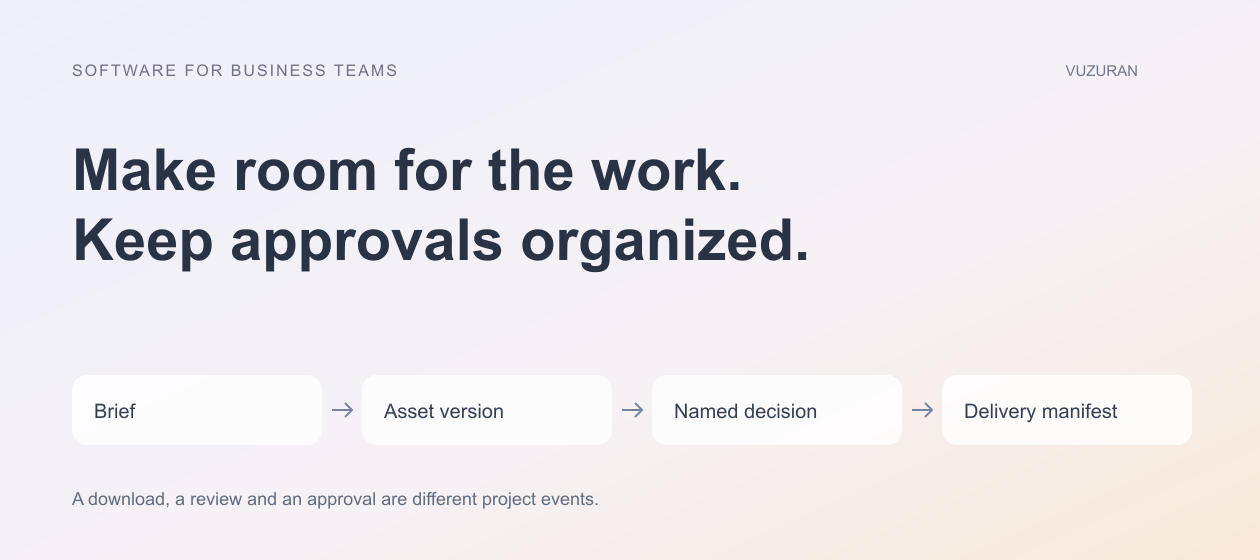
A file named final-v3-new does not reliably explain what changed or whether it is approved. Assign a version and preserve its relationship to the project and earlier asset.
Record the purpose of each export. A social preview, high-resolution master and caption file may belong to the same delivery but have different specifications. Show those distinctions in the interface so the client does not mistake a review copy for the final deliverable.
Use AI to summarize changes or prepare a delivery note only when it can reference the correct version. The assistant should not infer approval from the word “final” in a filename.
Bring feedback into one review process
Ask reviewers to attach feedback to the relevant asset or version. Consolidate conflicting comments into a decision for the authorized approver instead of treating every comment as an instruction to implement.
Frame.io's current Shares documentation, reviewed October 27, 2026, describes external review links with controls for comments, downloads and version visibility. It is an example of features to inspect, not a claim that every plan or tool offers identical behavior.
The official tutorial below is linked from that documentation. It demonstrates the provider's sharing interface; it is not a VUZURAN product demonstration.
Check the actual review experience using the client's intended access. A link that works for an administrator may expose too much or behave differently for an external reviewer.
Make approval a named decision
Decide who can approve the work and what that approval covers. A client may approve a concept without approving the final export. An internal producer may approve technical quality without authorizing publication.
Approval should identify the version and the decision, not merely say that someone liked the project.
Record the approver, date and relevant scope. If the asset changes materially afterward, apply the agreed re-approval process. Keep the earlier decision in the history rather than overwriting it.
| Project stage | Useful record | AI assistance that may fit |
|---|---|---|
| Briefing | Approved requirements and missing inputs | Summarize the request and flag gaps |
| Review | Version-specific comments | Group feedback without inventing agreement |
| Approval | Named decision on a defined version | Prepare a decision summary for confirmation |
| Delivery | Required files and access | Draft a manifest and client note |
| Follow-up | Confirmed receipt and open issues | Summarize unresolved questions |
Keep rights and source information with the assets
Track where source material came from and the permissions or terms relevant to its use. Do not assume an AI-generated element is automatically unrestricted or that a file supplied by a collaborator is cleared for every purpose.
The appropriate review depends on the project and material. Have the responsible person approve usage decisions; this article is not legal advice about copyright, likeness or licensing.
A tool can help organize a source register or flag missing fields. It should not invent a license, remove a credit requirement or present uncertain provenance as established fact.
Treat delivery as a checked handoff
Create a manifest of the required files, formats and versions. Test the links with the access the client will actually use. Check that the intended recipient can download the correct files and cannot browse unrelated projects.
Keep delivery confirmation separate from project approval. A client may approve the work but still be unable to access the files. Conversely, a downloaded preview is not proof that the final work was accepted.
Our custom assistant guide explains how to scope an assistant that prepares information without gaining unintended authority over client records or external communications.
Automate coordination before automating judgment
Repeated reminders, missing-input checks and draft summaries can be sensible pilot tasks. Preserve a human decision where the work involves creative direction, commercial promises or an exception to the agreed scope.
Measure whether the tool reduces searching and repeated questions. Include the effort of checking summaries and correcting misattributed feedback. A faster summary is useful only if it preserves the actual decision and the person responsible for it.
Keep the original material visible. A teammate should be able to trace a suggested task back to the comment or brief that supports it.
VUZURAN can help connect project intake, review and delivery in a custom tool or existing workflow. A project discussion can begin with one recent engagement and the handoffs that caused the most confusion. The software scope should support the creative team without adding an unnecessary administrative layer.
Frequently asked questions
Are creator-business tools the same as AI image or video generators?
No. This guide focuses on intake, review, approvals and delivery. Generation can be one part of the creative process, with its own requirements.
Can AI decide which client comments to implement?
It can organize or summarize feedback, but conflicting direction needs an authorized decision. Do not let a summary invent consensus.
Does a download mean the project is approved?
No. Delivery access, review activity and approval are separate states. Record the specific decision and version.
Do we need a custom portal?
Only if the workflow gap justifies building and maintaining one. Existing review and project tools may already cover the required process.
Sources & context
- Frame.io: Shares in Frame.io
Primary reference reviewed October 27, 2026. Public-service methodology is identified as such; business frameworks and examples are original VUZURAN editorial guidance.
Written by VUZURAN. Examples labeled hypothetical are illustrative; they are not customer results. VUZURAN service references describe our own business.