
The summary says sales increased, the chart looks polished, and the formula has no visible error. Then someone notices that two imported rows contain the same order and a refunded purchase still counts as revenue. The problem started before the AI wrote a sentence.
AI spreadsheet automation can help classify messy text, suggest formulas and explain patterns. Its usefulness depends on whether the workbook represents the business correctly. For a US founder reviewing a weekly operating report, the right first question is where each number came from and how it was checked.
The example records are hypothetical. They are not VUZURAN sales figures or accounting advice.
Choose the kind of work you want automated
Separate interpretation from arithmetic. Categorizing a free-text inquiry may benefit from language understanding. Adding confirmed invoice amounts usually calls for an explicit formula or database query. Explaining the result is a third task with its own evidence requirements.
Google's AI function documentation, reviewed October 27, 2026, lists text generation, summarization and categorization among its uses. It also states that the function returns text and does not have access to the entire spreadsheet or other Drive files. A useful prompt therefore needs a deliberately chosen range. Do not assume an AI cell has inspected every relevant tab.
Ask the team to write the reporting rule in ordinary language before generating a formula. If “sales” means different things to operations and finance, a better prompt cannot settle that business definition.
Preserve the input before changing it
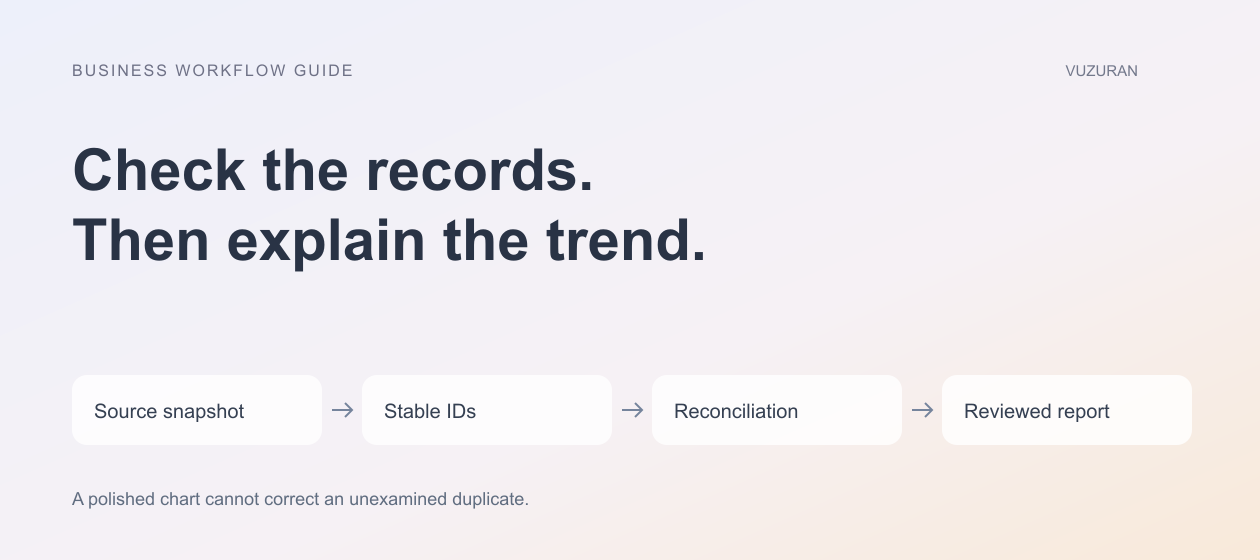
Keep an unchanged source export with a retrieval date and source name. Work in a separate sheet or version. Give each business record a stable identifier so a later sort or filter does not break the connection between the input and the result.
For an order report, keep the order identifier, currency, status and relevant date alongside the amount. A display value of 120 says little without its unit and business meaning. Avoid silently combining USD and another currency in one total.
Check date formats explicitly when importing material from different systems. A value such as 04/05 can be interpreted differently across locales. Use an unambiguous format in the normalized data and show the reporting timezone where a daily cutoff matters.
Write a reconciliation sheet
Create a small control sheet that compares the input, transformed records and final report. Its purpose is to reveal an unexpected difference, not to make every stage produce the same number regardless of the rules.
| Check | Question it answers | Example exception |
|---|---|---|
| Record count | Did every intended row arrive? | One page of an export was omitted |
| Unique business IDs | Did the import duplicate a record? | A retry appended the same order twice |
| Status totals | Which records qualify for this measure? | A refund remains in confirmed revenue |
| Currency grouping | Are units being combined correctly? | USD and CAD appear in one subtotal |
| Missing-field count | Which rows need a decision? | An amount has no associated date |
Reconcile the inputs and transformation before asking AI to explain the final trend.
For illustration, suppose an export contains three rows: order A for $100, order B for $50 and another copy of order A. The raw sum is $250; the unique-order sum is $150. Neither a confident summary nor a prettier chart establishes which figure the report should use. The documented duplicate rule does.
Evaluate classifications on real edge cases
If AI categorizes customer messages, define the allowed labels and include an “uncertain” outcome. Test short messages, mixed requests and language that resembles more than one category. A customer asking to change a plan and dispute an invoice may need two labels or a review queue.
Keep the original text beside the assigned label during the pilot. Review a sample for each category, including the common one. A classifier that assigns nearly everything to the largest category can look consistent while hiding the requests that matter most.
Do not let a text label directly trigger an irreversible action without a separate, authorized rule. A suggested billing category should not automatically issue a payment or change an account.
Inspect formulas beyond the first row
A formula can work for one cell and fail when copied. Check relative and absolute references, blank inputs, negative values and zero denominators. Test whether a newly appended row enters the intended range.
Use a small, hand-checked set of records to establish expected outputs. Then compare the generated formula against those expectations. Ask a qualified owner to review financial reporting logic when the result will be used for financial decisions.
For important calculations, request an explanation of the formula's assumptions and independently verify it. An AI explanation is useful context; it is not a second independent calculation.

Make refresh behavior explicit
A workbook changes after the initial demonstration. New records arrive, source descriptions change and someone edits a cell that an earlier AI result depended on. Decide which outputs refresh automatically and which require a deliberate regeneration step.
Google documents limitations around AI functions and generation. Check the current behavior for your specific setup rather than treating AI-generated text like a continuously recalculating numeric formula. Show a generated-at date where stale commentary could be mistaken for a current conclusion.
If the report feeds another system, send only reviewed outputs. Record which source version produced each exported report so an error can be investigated later.
Editorial principle: a report should let someone retrace the calculation, not merely read the conclusion.
Decide when a spreadsheet stops being enough
A spreadsheet may remain the best tool for a small, visible process. Consider a dedicated integration when several people overwrite each other's changes, refreshes depend on one person or downstream actions need reliable retry handling.
Our AI API integration guide explains why operation IDs and reconciliation matter when records move between systems. VUZURAN can help turn a fragile reporting routine into a connected workflow; a project discussion should start with the source data, reporting rules and review requirements.
Frequently asked questions
Can AI verify its own spreadsheet output?
It can help inspect formulas and suggest checks, but that is not independent verification. Use known expected results, explicit reconciliation and an accountable reviewer.
Should every spreadsheet formula use AI?
No. Use deterministic formulas for well-defined arithmetic. AI may be useful for interpretation, drafting or classification where the uncertainty is understood.
What should happen to uncertain classifications?
Keep them visible in a review queue. Do not force a confident label merely to fill every cell.
Is a total that matches the source always correct?
Not necessarily. Both may contain the same duplicate or inappropriate status. Check whether the source records satisfy the business definition of the measure.
Sources & context
- Google: AI function in Sheets
Primary documentation reviewed October 27, 2026. Evaluation framework, hypothetical examples and editorial analysis are original.
Written by VUZURAN. Examples labeled hypothetical are illustrative; they are not customer results. VUZURAN service references describe our own business.