

The meeting ends with a useful summary in everyone's inbox. A week later, the same question comes up: who was going to send the customer the revised scope? The notes mention the discussion, but the task never entered the team's actual work queue.
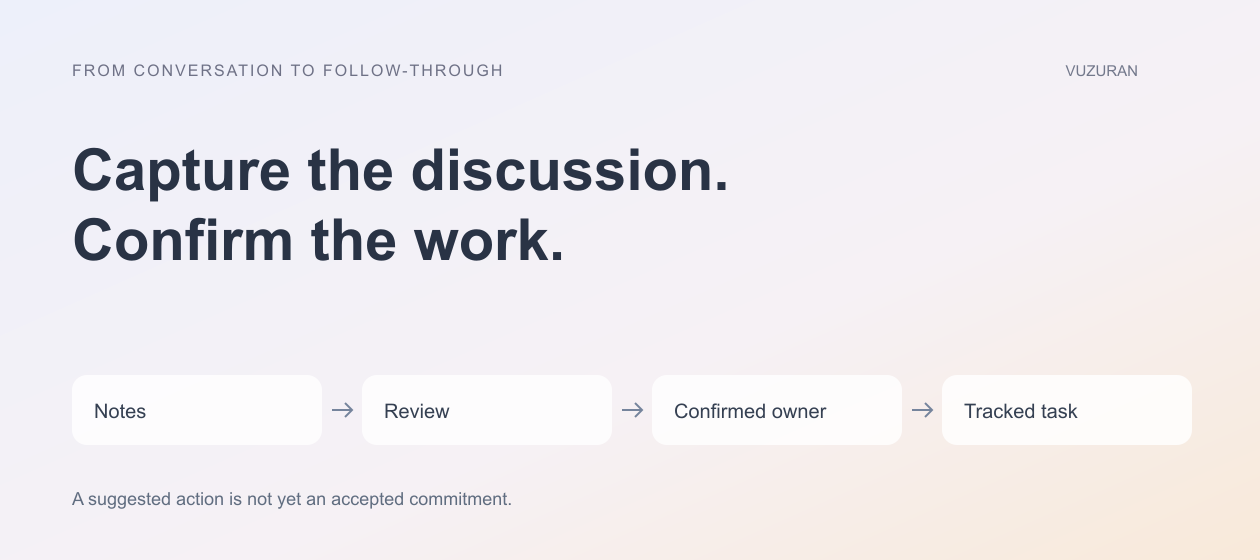
AI meeting notes can reduce the effort of capturing a conversation. Turning that record into work requires another set of decisions: what was agreed, who accepted responsibility, which date was confirmed, and where the team tracks completion.
This guide focuses on that handoff. It uses current Google Meet and Zoom documentation for product context, then offers an original review process that can be adapted to your tools.
Know what the meeting tool produces
Google Meet's Take notes for me documentation describes AI notes organized in Google Docs, with recap access connected to the meeting. Availability depends on an eligible plan and relevant settings.
Zoom's Meeting Summary guidance describes an AI-generated summary initiated through meeting controls and sharing options. Its account requirements and limitations are documented separately. Check your organization's configuration rather than assuming every attendee receives the same artifact.
These features produce material to review. Neither a readable summary nor a successfully delivered email proves that a customer commitment has been accepted by the person expected to perform it.
Separate discussion, decisions and actions
A meeting contains possibilities that never become commitments. Someone may suggest a launch date, ask whether a colleague can help, or mention work that already happened. Converting every such sentence into a task creates noise and can misrepresent the agreement.
During review, distinguish a decision from a proposed action and an unresolved question. Keep links to the supporting notes or permitted transcript where available. If the record is ambiguous, ask the participants rather than letting the workflow invent certainty.
A name mentioned beside an action is not evidence that the person accepted ownership. Confirm the owner before assigning consequential work, particularly when the meeting includes external partners or customers.
Use a small follow-up record
A useful task needs more than the sentence extracted from the meeting. It needs context and a finish line. The following template is an original handoff aid:
| Field | What to record | What to avoid assuming |
|---|---|---|
| Outcome | The deliverable or decision needed | That a topic heading defines completion |
| Owner | A person who confirmed responsibility | That the most frequently named person owns it |
| Due date | A confirmed date and relevant timezone | That “next Friday” is unambiguous |
| Source | A permitted link to the supporting record | That everyone can access the entire meeting |
| Review state | Proposed, confirmed, completed, or blocked | That generated text is already approved |
Keep the template short enough that someone will use it. Additional fields should serve a real operating need rather than make the process resemble a database demonstration.
Review before creating external commitments
For a hypothetical agency call, the notes might say that the team will “try to get a first cut over next week.” That is different from a confirmed delivery deadline. A workflow should preserve that uncertainty.
A reviewer can turn the discussion into a proposed internal task, confirm the date with the responsible person, and then prepare any customer-facing follow-up. If the date changes during review, make sure the outgoing message reflects the confirmed version.
Keep customer commitments separate from internal reminders. Automatically adding a tentative date to an internal queue may be acceptable under your policy; automatically promising it to the customer has a different consequence. Define that boundary before connecting an email-sending tool.
Put the task where the team works
Choose the destination your team uses to manage work. Creating a second task list inside the note-taking tool can add another queue to check. An integration should use stable identifiers to connect a meeting action to its task or project.
Plan what happens when a summary is regenerated or corrected. The workflow should update or flag the existing proposal rather than create another task every time it reads the notes. Preserve the relationship between the source meeting, proposed action, and destination record.
Also decide what happens when a task is rejected. A reviewer may conclude that the note misheard a statement or that the action was never agreed. Record that decision so the same suggestion does not reappear on the next synchronization.

Protect the meeting's information
Meeting records can contain customer details, commercial plans, and personal information. Review who can access the notes and who receives derived tasks. A person assigned a task may need a narrow excerpt rather than the complete conversation.
Follow your organization's notice, consent, and data-handling requirements before using recording, transcription, or AI note features. The product documentation describes controls and availability, but it does not settle every organization's obligations.
Test a meeting with internal and external attendees. Verify what each role can see after the call and what information an integration sends to another system. Do not infer permissions from the fact that someone attended.
Measure whether follow-up improves
For a pilot, track the time spent reviewing notes, the number of proposed actions corrected, and how often confirmed work reaches the right destination. Examine missed actions as well as extra ones.
A faster summary is useful, but the business outcome is clearer follow-through. If the team spends substantial time deleting incorrect assignments, narrow the extraction rules or require more explicit confirmation at the end of the meeting.
An original operating rule is:
End the meeting with an agreed action list, then use the AI record to support and check that list.
VUZURAN can help connect reviewed meeting outcomes to project and CRM workflows. Bring a sanitized example and your existing task system to a discovery call. The project should preserve responsibility while reducing copying between tools.
Frequently asked questions
Can AI notes create tasks automatically?
An integration can be designed to create task proposals or tasks under an agreed policy. Decide which fields require review and how to prevent duplicates before enabling that behavior.
Should every action have a deadline?
Use a confirmed date when the work needs one. A missing or tentative date should remain visible rather than being replaced with an invented deadline.
Are meeting summaries the same as transcripts?
They serve different purposes. A summary condenses information; a transcript records spoken content in another form and can also contain errors. Check the product's available artifacts and review important claims.
How do we evaluate the workflow?
Compare confirmed meeting actions with the resulting work queue. Measure missed items, incorrect assignments, duplicate tasks, and the effort needed to review the proposals.
Sources & context
- Google Meet: Take notes for me
Primary reference. Reviewed for this article; linked for context, not a claim of endorsement.
- Zoom: Using Meeting Summary with AI
Primary reference. Reviewed for this article; linked for context, not a claim of endorsement.
Written by VUZURAN. Examples labeled hypothetical are illustrative; they are not customer results. VUZURAN service references describe our own business.